
A Google Business Profile suspension can affect your business’s visibility on Google Search and Google Maps. When a profile is suspended, customers may have difficulty finding your business information, checking your operating hours, getting directions, or contacting you through your listing. For local businesses that depend on Google Maps visibility, this can become a serious concern.
If your Google Business Profile has been suspended, you should not immediately create another profile, change your business information repeatedly, or submit multiple appeals without understanding the reason. You must first identify the possible policy violation, review your business information, collect supporting documents, and follow Google’s official reinstatement process.
This guide explains how to remove Google Business Profile suspension step by step, including how to identify the suspension type, check eligibility, correct business information, prepare evidence, submit an appeal, respond to Google’s decision, and prevent future suspensions.
Whether you operate a local shop, office, service-area business, professional practice, restaurant, coworking space, or commercial property business, the same fundamental principle applies: your profile must accurately represent an eligible business and comply with Google’s guidelines.
A Google Business Profile suspension occurs when Google restricts a business profile because of a suspected or confirmed violation of its guidelines, an eligibility concern, or another issue affecting the profile’s compliance.
A suspension is not necessarily a permanent removal. Eligible businesses may request reinstatement after identifying and correcting the underlying issue. However, reinstatement is not guaranteed, and the outcome depends on Google’s review.
A business owner should distinguish between a suspension, a disabled account, a verification problem, and an ordinary ranking issue. These situations can require different solutions.
Google may suspend a profile for several reasons, including:
Business information that does not accurately represent the real-world business.
A business name containing unnecessary keywords, promotional text, or location names that are not part of its real-world name.
An address that does not meet Google’s eligibility requirements.
A virtual office, mailbox, or coworking address presented as a staffed business location when the business does not meet the relevant requirements.
A service-area business displaying an address where customers are not served in accordance with Google’s rules.
Duplicate business profiles created for the same business.
Inconsistent or misleading contact details, business categories, or operating information.
A business that does not qualify for a Google Business Profile.
Suspicious changes, account security concerns, or other policy violations.
These are possible causes, not a definitive diagnosis. Google does not necessarily disclose every signal that contributed to a suspension. You must review the applicable policy and the information available in your account before deciding what to correct.
Start by signing in to the Google account that manages the affected profile. Review the status shown in Google Search, Google Maps, or the official Business Profile management and appeal interfaces.
You may encounter a suspended profile, a disabled or restricted account, a verification issue, or a profile that is visible but performs poorly in search results.
If Google identifies a specific policy issue, read that information carefully. If the message is general, review the business profile against the official guidelines rather than assuming a particular violation.
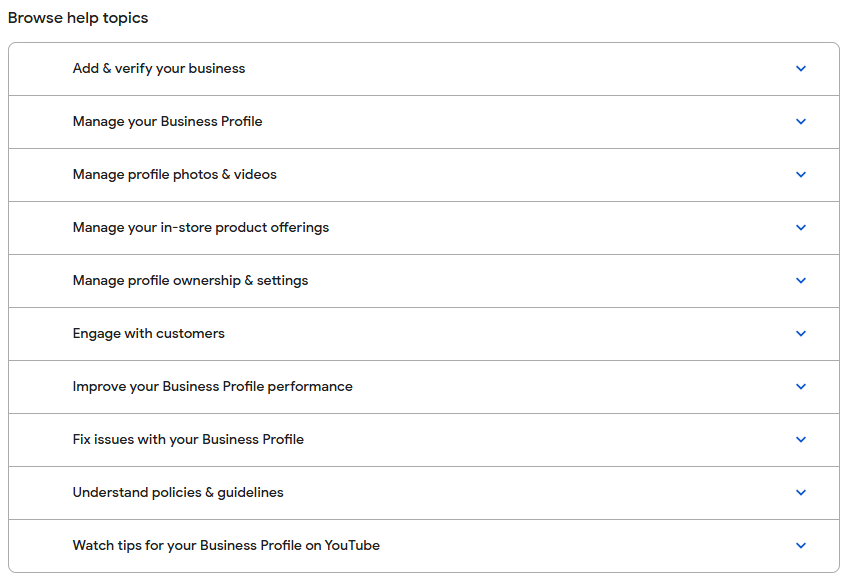
You should begin with Google’s official resources:
Google Business Profile Help Center: https://support.google.com/business/
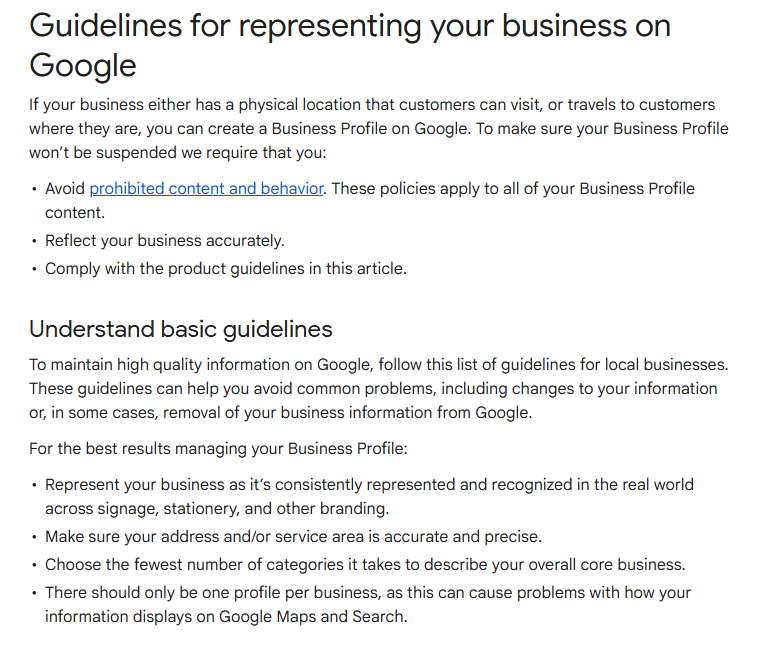
Google Business Profile guidelines: https://support.google.com/business/answer/3038177
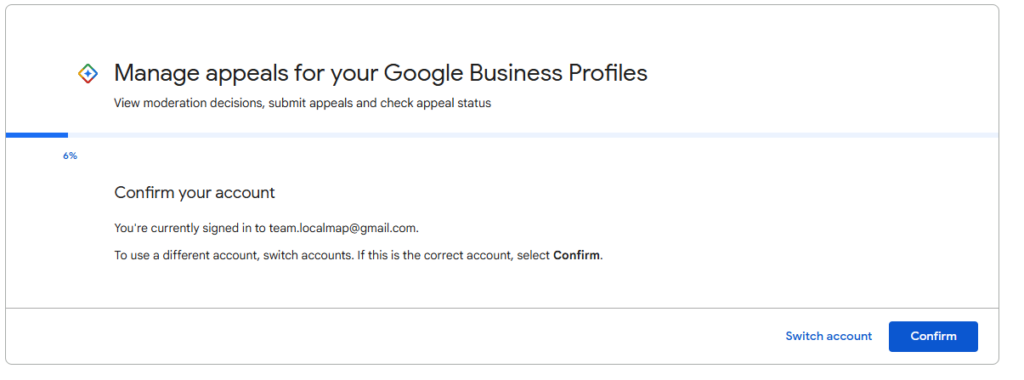
Google Business Profile appeals tool: https://support.google.com/business/workflow/13569690
The available appeal options depend on your account and case. Follow the instructions shown after signing in with the account that manages the affected business.
The business owner or an authorized representative can seek reinstatement for an eligible business profile. The person submitting the appeal should have legitimate access to the profile and accurate information about the business.
If you are an agency managing profiles for clients, you must have proper authorization. You should not claim ownership of a business you do not represent, submit fabricated evidence, or misrepresent your relationship with the client.
A business generally must make in-person contact with customers during its stated hours to qualify. Eligible examples can include customer-facing shops, restaurants, offices that receive customers during business hours, and service-area businesses that visit customers at their locations.
Online-only businesses, lead-generation companies without eligible in-person customer contact, and businesses using an address solely for mail or registration may not qualify.
A coworking space or serviced office does not automatically make every company using its address eligible for a separate profile. Each business must independently satisfy Google’s rules. A business claiming a staffed office location must genuinely operate there and meet the relevant requirements.
You should submit the appeal after you have reviewed the suspension, identified the likely issue, corrected any non-compliant information, and gathered the appropriate supporting evidence.
Do not submit an appeal simply because you want the profile restored quickly. If the underlying issue remains unresolved, the appeal may be unsuccessful.
You must also check whether Google has specified a deadline or a particular appeal procedure. Follow the instructions and any deadlines displayed in your account.
There is no universal number of documents that guarantees reinstatement. Your evidence must be relevant, genuine, readable, and consistent with the business information on the profile.
Depending on the business and the issue, useful documents may include:
Business registration or incorporation documents.
A current trade licence or other applicable government-issued business documentation.
Utility bills or other accepted proof connecting the business to its operating location.
Lease agreements or occupancy documents.
Photographs of permanent signage and the actual premises.
Photographs showing the workspace, equipment, or customer-facing area.
Documents demonstrating that the business name and address are accurate.
Additional records specifically requested by Google.
Not every business needs every document. You should submit only relevant materials that you are authorized to share and that support the facts of your case.
The following process provides a structured way to investigate a suspension, correct potential policy violations, and request reinstatement through Google’s official channels.
First, sign in to the Google account associated with the business profile. Look for a suspension notice, restriction message, or an appeal option.
Check whether the problem affects the profile itself or the Google account managing it. A verification issue, account access problem, duplicate listing, or poor local ranking should not automatically be treated as a suspension.
You must identify the actual status before making changes. You should save a screenshot of the message and note any policy information or instructions provided by Google.
Action checklist:
Sign in to the correct Google account.
Open the affected Business Profile.
Record the exact status or message.
Check whether Google has identified a policy concern.
Open the official appeal interface if it is available.
Visit the official guidelines at https://support.google.com/business/answer/3038177.
Review the rules for business eligibility, names, addresses, service areas, categories, multiple locations, and profile representation.
Your business must meet Google’s eligibility criteria. You should not rely on what competitors are doing, because another profile appearing on Google does not prove that it complies with the guidelines.
For example, adding phrases such as “Best Office Space in Hyderabad” to a business name is not appropriate unless those words genuinely form part of the business’s real-world name. Similarly, an address should not be displayed as a customer-facing location if the business does not meet the relevant location requirements.
Action checklist:
Compare the real business name with the profile name.
Check the address and customer-contact arrangements.
Review the primary and additional categories.
Confirm that the business type is eligible.
Identify every possible discrepancy before appealing.
Create a list of possible problems instead of making random changes.
Ask yourself whether the business name contains extra keywords, whether the address is accurate, whether the location is staffed as claimed, whether duplicate profiles exist, or whether the business has changed its operating model.
Also review recent edits. A change to the address, business name, category, ownership, or other important details may be relevant to the investigation, although timing alone does not establish the cause.
You must base your diagnosis on the facts and Google’s published policies. You should not assume that every suspension is caused by keyword stuffing or that changing one field will resolve the issue.
Action checklist:
Review the profile’s current information.
Compare it with official business documents.
Review relevant recent changes.
Identify any duplicate listings.
Write down the suspected policy issue and how you will correct it.
Your profile name should match the name used consistently in the real world, such as on permanent signage, business documents, the website, and customer-facing materials.
Remove promotional phrases, unnecessary keywords, service lists, phone numbers, and location names that are not part of the actual business name.
For example, a business genuinely named “Covibe Coworking Space” should not automatically expand its profile name to “Covibe Coworking Space Best Office Rental in Hyderabad Near Metro” merely to improve search visibility.
You must use the legitimate business name. You should retain supporting evidence that demonstrates the correct name and avoid making unrelated edits while preparing the appeal.
If the existing name is already accurate and compliant, do not change it unnecessarily.
The address must accurately represent the business and satisfy Google’s location rules.
If customers visit your premises, the location should be eligible for customer visits and appropriately staffed during the stated hours. Permanent signage may be relevant evidence for a business operating at that location.
If you travel to customers and do not serve them at your own address, you may need to operate as a service-area business and hide the address from the public profile.
A virtual office, mail-receiving address, or coworking space address should not be used to suggest that a business operates from a staffed customer-facing location when it does not meet the applicable requirements.
You must not invent an office presence, display an address solely for ranking purposes, or use an address without a genuine business basis. You should check the specific eligibility rules before changing the address.
Search Google Maps for the business name, address, phone number, and other identifying details. Check whether multiple profiles represent the same business at the same location.
Duplicates can confuse customers and may create policy concerns. However, separate departments, practitioners, or eligible businesses at the same address can sometimes have legitimate individual profiles, depending on the applicable rules.
Do not immediately delete profiles without investigating their ownership and purpose. You should follow Google’s duplicate-profile procedures and retain the legitimate profile where appropriate.
You must not create a replacement profile simply to bypass a suspension. Doing so may complicate the case rather than resolve it.
Your primary category should describe the main business activity. Additional categories should represent genuine services or activities offered by the business.
Check the website, phone number, opening hours, service descriptions, and other information for accuracy. Remove misleading claims and information that does not reflect the real business.
You should avoid adding irrelevant categories or creating multiple profiles for different keywords. Your profile must describe the actual business, not every search term you want to target.
If these details are already accurate and compliant, avoid unnecessary changes. Focus on the specific issues you have identified.
Review the Google account that manages the profile. Make sure the account is accessible, protected, and controlled by an authorized person.
Update the password if you suspect unauthorized access, enable two-step verification where available, and review account access and third-party permissions. Remove access only when you are confident that the person or agency no longer needs it and that the change is authorized.
If a former employee or agency controls the profile, use Google’s official ownership or access-recovery process.
You must not share passwords or verification codes with unknown parties claiming they can guarantee reinstatement. You should also avoid granting unnecessary account permissions to third-party recovery services.
Gather documents that establish the business’s identity, eligibility, location, and actual operations.
Choose evidence that directly addresses the potential policy issue. For an address-related suspension, relevant location documents and photographs may be more useful than unrelated marketing materials. For a business-name issue, consistent official documentation and signage may help demonstrate the correct name.
Documents must be genuine and legible. The business information should match across the evidence wherever applicable, or you should be prepared to explain legitimate differences.
You should not create fake invoices, alter government documents, stage misleading photographs, or submit information that misrepresents the business.
Use the official appeal tool:
https://support.google.com/business/workflow/13569690
Sign in with the Google account that manages the affected profile and select the relevant business, if prompted.
Review the suspension information and follow the available steps. The interface and requested details may vary depending on the profile, account status, and type of enforcement action.
If the tool does not show the affected profile or does not offer the expected appeal option, consult the official Help Center and follow the alternative instructions provided for your situation.
You must use the legitimate appeal process. You should not send sensitive documents to an unverified email address or rely on a third party that claims to have a special reinstatement channel.
Provide the requested information clearly and honestly. Explain the actual business model, the nature of the location, and the corrections made in response to the suspected policy issue.
Keep the explanation focused. A long account of how much the business depends on Google Maps does not replace evidence of policy compliance.
You should explain why the business qualifies and identify the documents that support your explanation. If the suspension resulted from a mistake or misunderstanding, state the relevant facts without making unsupported claims.
Before submitting, check that the profile details, documents, and appeal explanation are consistent.
Review the entire submission before clicking the final submit button. Confirm that the selected business is correct and that all requested evidence is attached in the required format.
Save the confirmation or reference number if one is provided. Monitor the email account associated with the appeal and check for further instructions.
You should not submit repeated, identical appeals without a reason or create another profile while waiting. Multiple unnecessary submissions can make the process harder to manage.
You must follow any deadlines or additional evidence requests provided by Google. If Google requests more information, respond with accurate material relevant to the request.
If Google approves the appeal, follow any instructions provided and verify that the profile is accessible and accurate. Check the business name, address, categories, hours, phone number, website, and other essential details.
If Google does not approve the appeal, read the decision and review any further appeal or evidence options that Google makes available. Do not assume that every decision can be appealed indefinitely.
You should identify any remaining compliance issue before taking another step. If additional evidence is permitted, provide new, relevant supporting information rather than simply resubmitting the same explanation.
Once reinstated, verify that the profile represents the business correctly. Confirm that customers can find the listing and that the business information is accurate.
Keep records of the documents submitted, the decision received, and any changes made during the process. This documentation may be helpful if a future verification or compliance question arises.
You must continue following Google’s guidelines after reinstatement. You should avoid major profile edits that are not necessary, but you may make legitimate updates when the business actually changes.
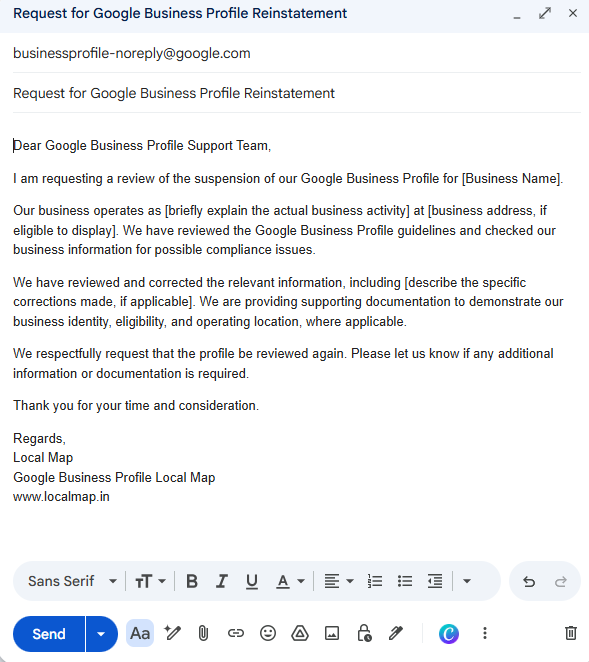
An appeal should be professional, concise, factual, and supported by evidence. It should explain what the business does, why it is eligible, what issue was identified, and what corrections were made.
Do not claim that changes were made if they were not. You must tailor the appeal to the actual suspension and the evidence available. A template cannot guarantee reinstatement, and generic wording is not a substitute for correcting policy violations.
Several actions can complicate a suspension case:
Creating a new profile to bypass the suspension.
Submitting an appeal before correcting an identified policy violation.
Using fabricated documents or misleading photographs.
Adding keywords to the business name.
Repeatedly changing the address or other major details without a legitimate reason.
Submitting repeated appeals that contain no new information.
Paying an unverified person who promises guaranteed reinstatement.
Ignoring Google’s requests for additional information.
Displaying a virtual or coworking address without meeting the relevant eligibility rules.
Assuming that a business registration document alone proves eligibility for a profile.
Prevention starts with accurate business information and consistent compliance.
You should review the profile periodically and update it when the business genuinely changes. Keep business documents, photographs, address records, and ownership information organized so that you can respond to legitimate verification requests.
Your business name must remain consistent with its real-world identity. Your address and operating model must accurately represent where and how customers interact with the business.
You should limit account access to trusted, authorized people and secure the Google account. If an agency manages the profile, it must follow Google’s rules and make changes only with proper authorization.
You must not create profiles for ineligible businesses, use misleading locations, or create duplicates to target more keywords. You should also avoid making promises about rankings or assuming that reinstatement will immediately restore previous search visibility.
A simple compliance review every month or after a major business change can help identify discrepancies before they become larger problems.
Use this checklist before sending a reinstatement request:
I have confirmed the actual suspension or restriction.
I have reviewed the relevant Google Business Profile guidelines.
My business is eligible for a profile.
My business name accurately reflects its real-world name.
My address and customer-contact arrangements comply with Google’s rules.
I have investigated potential duplicate profiles.
My categories, hours, website, and contact details are accurate.
I have corrected the relevant policy violations.
My supporting documents are genuine, legible, and relevant.
My appeal explanation matches the facts and evidence.
I am using Google’s official appeal process.
I have saved the confirmation and will monitor Google’s response.
Question | Answer |
|---|---|
How long does Google Business Profile reinstatement take? | The processing time varies depending on the case, the type of enforcement action, the evidence provided, and whether Google requests additional information. Follow the instructions in the official appeal interface rather than relying on a guaranteed timeframe. |
Can I create a new profile after suspension? | You should not create a new profile to bypass an existing suspension. Follow Google’s reinstatement instructions for the original profile and investigate any duplicate-profile issues. |
Can an SEO agency remove a Google Business Profile suspension? | An experienced SEO agency can help review policy compliance, organize supporting documents, and prepare an appeal. However, Google makes the final reinstatement decision, and no legitimate agency can guarantee approval. |
Does changing the business name remove the suspension? | Not necessarily. Correcting a non-compliant business name may resolve one issue, but it will not automatically resolve other problems involving eligibility, address information, account access, or policy violations. |
Can a coworking space address be used for Google Business Profile verification? | It depends on the business’s actual operations and Google’s eligibility requirements. Renting a desk or using a mailing address does not automatically qualify a business to display that address as a customer-facing location. |
What if Google rejects my appeal? | Review Google’s decision, identify any remaining compliance issues, and use any additional appeal or evidence options made available by Google. Provide genuine supporting documents and avoid creating duplicate profiles to bypass the suspension. |
Understanding how to remove Google Business Profile suspension step by step requires more than submitting an appeal. You must confirm the suspension, review Google’s policies, identify the likely cause, correct the relevant issues, collect genuine supporting evidence, and follow the official reinstatement process.
You should be patient, keep accurate records, protect your account, and respond carefully to any further requests from Google. If the business is eligible and the suspension can be resolved through the available process, a well-prepared, evidence-based appeal gives Google the information it needs to evaluate the case.
The most important rule is simple: correct the underlying compliance issue before requesting reinstatement. A genuine business, accurate information, relevant documentation, and a clear appeal are the appropriate foundation for recovering a suspended Google Business Profile.
Website: https://localmap.in/
Email: team.localmap@gmail.com
Phone / WhatsApp: +91 83095 87651
Contact LocalMap to discuss your business requirements and identify the services that may be appropriate for your goals.